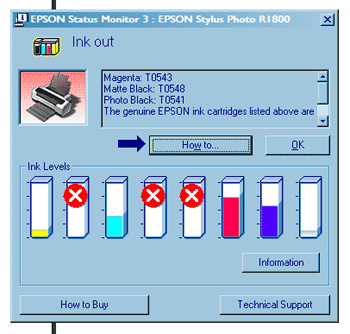
My Epson Stylus Photo R1800’s been running low on ink in a couple of cartridges for a few days now. I’ve been putting off ordering them until this weekend. Now I find that when the printer believes a cartridge has reached 0%, it won’t print anything at all, even if it doesn’t need that colour. Users (i.e. me) are forced into buying new cartridges at a time when they don’t actually need them in a pathetic exercise of Epson’s control. Workflow is interrupted, plans out of the window.
So now, in order to print something important which needs to be done this afternoon, I am going to have to get on a train and go into a local town, wasting a couple of hours of my life and resulting in entirely unnecessary energy usage and carbon emissions. That’s relatively easy for me: I live next to a railway station. But in areas of the world where it isn’t convenient or possible, how can such thoughtless design be tolerated? Printers a few years ago allowed you to keep printing until the cartridges were actually empty. You knew when to stop because you could see.
Hey Epson: if you push your customers around, they’ll walk away. Forever. It’s as simple as that. People’s time is precious. Convenience is important. There’s no way I’ll ever buy another Epson product or recommend them to anyone else. And I’m a techy guy: occasionally, people do ask my opinion on products. (Of course I’m going to buy cheap refill cartridges; ultimately I may have to get a continuous ink supply system)
Yeah, it’s a rant; it’s also a pathetic piece of design embodying absolute contempt for the customer.
(Sadly the SSC Service Utility mentioned a few months ago doesn’t seem to allow the ink levels to this particular printer to be re-set, though it’s undoubtedly of great use on other models.)


This is one of my pet hates, and it’s not just Epson that does this. If my black ink runs out, then I should be able to print using the colour ink and vice versa. There really is no excuse for a printer to stop working if one out of two cartridges stops working. If I could find a printer manufacturer that didn’t behave in this way, I’d buy one of their products in a shot. So far, I’ve not managed it.
I’d like to know too, Francis if you find a modern printer with that behaviour. I did have an old Hewlett-Packard Deskjet 320 which only had space for one cartridge (colour OR black) - it used C, M & Y to make a murky grey-brown kind of black. But that’s about it.
Perhaps my rant in the above post is a little overblown, but it completely interrupted my plans for the day, and that annoys me.
Manufacturers may simply be obsessing that in no circumstances may they ever permit any printing if there’s the slightest avoidable risk that substandard results may occur.
I expect they will introduce a new override button for you - however, it will attempt to print a watermark over the output, e.g. “Ink Cartridge Depleted!”
This is a comment from an anonymous poster whose comments keep getting trapped by the spam filter - for some reason, I can’t get the software to ‘un-spam’ it succcessfully, so I’m re-posting it manually:
FWIW, My Canon i860 has been complaining about an empty magenta cartridge for some time now but it’s happy to print black and white documents.
I am as angry as I have been in a long time. My Epson stylus cx5000 has just stopped me twice in one day to replace color cartridges when I have always had my printer set for black only. I have found out now after the window of returnabality at office depot has closed that even when I print in black only, the printer cleans the color heads into a diaper. No one offered that info when I bought it and I talked long and hard to the salesman when I bought it. I have spent sixty dollars on color cartridges that I have not used. I have never believed in pirating or infringing on intellectual property but this is not inellectual. This is pure and simple pillaging of my resources and I will not let it happen. I am going to hack. I am going to look for a class action suit to join against Epson. I am going to tell everyone I know. I am going to promise support to the first printer company that will build their own refillable printer well. Somebody is going to make millions by doing this. We need a publicly owned printer protocol like an old Ford Tractor with lots of replaceable parts that will run forever. I will not apologize for my rant. I am angry enough to make a project out of this.
i have the same problem with my epson cx3500. it is only the printer driver which is the problem. if there is some hack out for the driver, you will be able to print with the cartridges which have ink. hurray to lexmark and canon, they let you print without other cartidges installed (if black is) in b&w.
Glad I’ve taken a look here.
I have spent hours trying to figure out why my printer wont work. I am trying to print a letter. I now see the reason it wont print is because my Magenta Cartridge is emply - I mean who writes a letter in Magenta? That said I don’t know how my colour cartridges run out in any event because I rarely print anything in colour. This is a mystery!
because there is a stupid cleaning cycle programmed each time you turn on your printer. the printer clean the head each time you turn it on. and this causes color loss. @ Angela Chadwick
I got a Epson C59. and I cant reset the ink cartridges with the SSC utility 4.30.
It would be very helpful if anyone can tell me step by step what and how to do it.
help plz. anyone.
I can’t say for sure if all Canon’s behave nicely, but my 4200 will print B&W if a color tank is dry. I believe it even gives you the opportunity to continue printing a document in progress if a tank runs out during the print cycle, though it warns you that you might damage your printer by doing so.
I have the same problem, I think EPSON uses this as a "revenue spreading strategy" something like the software licensing fee, but at a more primitive, rubbish level. I’d join action against EPSON, i feel cheated after buying a Stylus DX7400, cartriges run out accurately once a week with very little printing, cost a fortune to replace and printer won’t pring with just the cartridges it needs. What a SCAM, never buy EPSON products!
I have got an epson c46 printer and suffer the same problems as you guys are getting, but i’ve had this printer for 4 yrs now and while its very cheap on ink refills £ 12 for both carts then im happy putting up with it. my main use is for document printing only and have a hp printer for doing the photos.
I am well f*/ked off now with my printer!!!! Two of my colours ran low and was unable to replace them for over a month due to money problems. When I finally replaced them I replaced all but the black as they were nearly all low apart from the black which was half full. For some strange reason after changing all the other colours the black would not print at all. After running the cleaning cycle several times all of my new colours had run to 1/4 full and there was still nothing with the black. I switched it all off and came back to it 1 day later. Run a print job through it and the black was printing again but missing some lines, so I once again run the cleaning process… next the black ink ran out!!! I then went and bought another one to which the printer told me was incompatible!!! I then turned off all power and switched it back on again, the black was now working but the blues were now missing lines!!! So I ran another nozzle clean and now the printer is telling me 4 of my new colours have run out of ink!!!!! I will never but another Epson ever again, I’ve just wasted £30 on ink and have got nowhere… What a rip off..
I don’t understand why when running a cleaning cycle it has to use ink on the colours that aren’t defective, also why tell me that the ink has run out when previously there were no signs of it fading.. plus why stop me from using the printer altogether when just one colour has run out. This printer although new is headed for the skip… And I am not a happy chap…
Epson.. you suck bug time.
Epson is completely rubbish. I have a C64 and the same problems, even with the SSC service utility which used to work. Completely fed up and hate Epson will never buy another.
Epson please read this and take notes … you seriously need to do something about this, if you don’t I hope you go out of business!